H.
Project Overview:
The Product:
An invoicing app that could allow new users to easily learn how to start using this web app to create, send and track invoices.

The Problem:
I found that since invoice creating and tracking in a web app may be unfamiliar to someone who first try this approach, or to someone who intend to change a new invoicing app, hence it might feel complicated for those people to do it this way.
My role:
I planned this project for portfolio showcase, and I conducted every step of this project by myself, from user research to prototype.
Project Duration:
8 weeks.

The Goal:
I try to create a tutorial of this invoice app to guide the users how to create and track invoices step by step, and simplify the content and layout of the app to let users feel that it is a easy thing to do.
Responsibilities:
•User research.
•Define problems and ideate solutions.
•Wireframes and prototype.
•Visual design
Understanding the Users:
User Research:
I conducted user research through interviewing invoicing app users to find out what are the common issues they face when they are trying to send and track invoices digitally.
Pain Points:
-
It takes time to familiarize with a new invoice app.
-
They are busy at their work and are reluctant to spend time to learn a new digital tool.
-
Creating invoice digitally feels complex and boring.
Persona:

User Story:
As a web development agency owner who is busy at works, I want to learn to use invoicing web app to help me create, send and track invoices quickly and easily, so that I can focus more on my business.
Problem Statement:
Zack is a web development agency owner who needs to quickly and easily learn to use an invoicing web app to help him create, send and track invoices, because he is busy at his work.
Ideate Solution:
Goal Statement:
Our invoicing app will let users have a tutorial about how to create, send and track an invoice from start to finish, as well as a simple and hierarchical interface to look at, which will affect small business owners who is busy at their work by letting them quickly and simply learn to use an invoicing web app.
Solution:
1.Design the interface of the invoicing web app clean and easy-to-read which might provide a sense of simplicity.
2.Have a tutorial mode which teaches how to create, send, and track an invoice step by step.
Wireframes:
Paper Wireframes:

I created the paper wireframes first for initial layout study, as well as the variation format on tablet and phone screen size.
Digital Wireframes:
I transfered the paper wireframes into digital version for readability and preliminary design.
Then I designed the layout of the same page on different screen sizes.
Invoice Tracking Page:
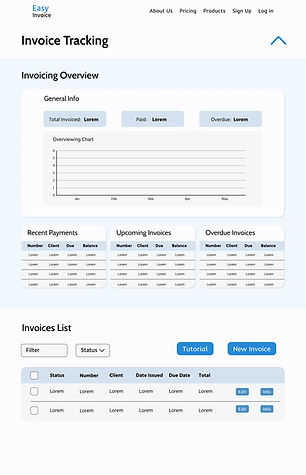
This page mainly is about all the created invoices in a list format that could let you track the recent status of them, such as “paid” or “sent”. Other than this, it also has an overview section which could provide you the most essential information of all the invoices. Tutorial is also located on this page.
Foldable Invoice data overview section with a diagram representing recent activities.
Invoice tracking list with a filter function at the top left, as well as a “tutorial” button which could open the tutorial popup pages at the top right.


Invoice Creating Page:
This page has several forms to be filled to create an invoice, such as “receiver”, “due date”, “products details”, etc. After filling, you can choose to save this invoice as draft or send this invoice.


Invoice preview page:
All the filled-up invoice information shown in a list format for review. There is a pdf document about the invoice at the right. If there is no mistake, you can choose to send this invoice by clicking the "send" button at the top right. After sending, you will return to the tracking page, and the status of the just sent invoice will be shown as “sent”. After the customer paid your fee, the status will be shown as “paid”.


Low-Fidelity Prototype:


Clickable Prototype Links:
Mockups:
Mockups:


I chose to design the interface in a clean and simplified style which intended to provide a friendly and stress-free impression that could potentially increase the readability and reduce the complexity for new users who may not be very familiar with invoice tracking.
You can click the arrow to show or hide the invoicing overview section

After clicking “tutorial” button, a popup page would show up and guide the users how to create an invoice step by step. There is an index representing the sequence of the steps at the top left corner, as well as an arrow which could move you to the next step at the bottom right. You could always close the tutorial by clicking the cross at the top right.

High Fidelity Prototype:


Clickable Prototype Links:
Takeaways:
Through this project, I gain a deeper understanding of emphasizing with users and coming up with solutions that could actually solve their pain points.
I learnt to investigate the field of certain industries which I am not quite familiar with. I also learnt to put user problems into center and make design decisions around it. Nevertheless, I also noticed the power of simplicity for the design of functional web app.
Going forward, I would like to collect more feedbacks and data after actual usage by the users to know the effectiveness of my design. I also would like to refine the tutorial mode more by adding some animations.
